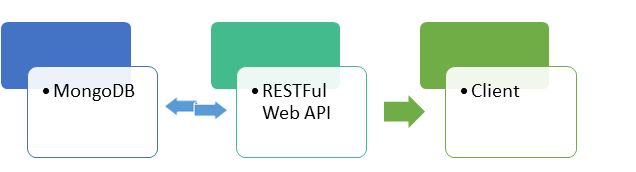
Application Architecture
Application we are going to build is very simple. We are going to use MongoDB as our database and will create .NET Web APIs for data operation on MongoDB and there will be a test client to use our Web APIs.
Database Setup
Creating database is a piece of cake in MongoDB. You can refer my previous article for more details. We just need to write the following command to create database named studentsDB and collection named students:
use studentsDB
db.students.insert({ "_id" : 1, "RollNo" : "rol1", "Name" : "vikas", "Class" : "12th" })
Above command will create collection and insert a record on it.
For the sake of simplicity I am only creating one collection ‘students’ and will perform all our operations on this collection.
Creating Web API
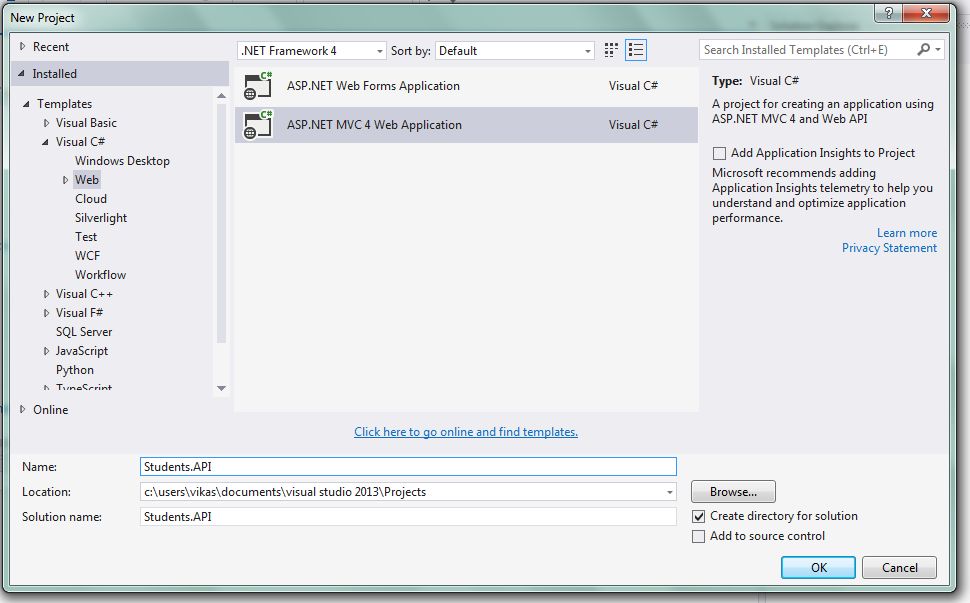
Open Visual Studio to create a new project, I am using Visual Studio 2013 community edition. You can use Visual Studio 2013 or above version for the same.
Steps:
- Select Web, then ASP.NET MVC 4 Web Application.
- Give Project Name: Students.API.
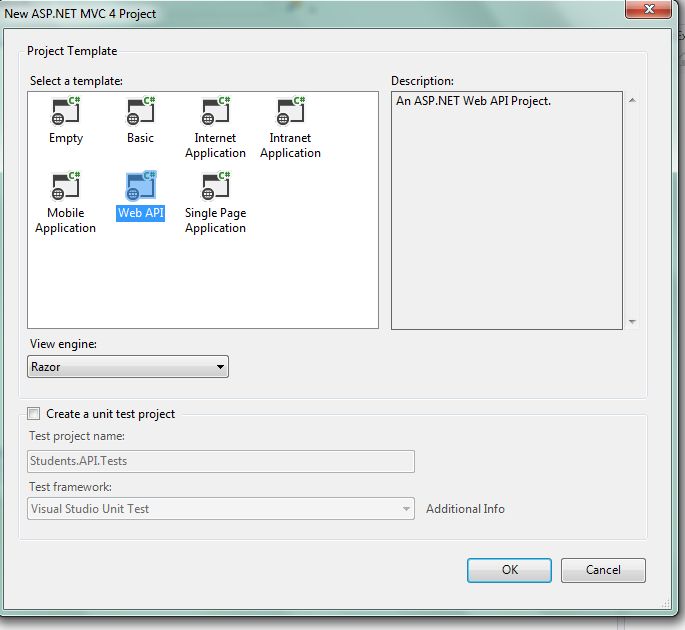
Select Web API and click OK
- That’s the power of Visual studio within few clicks we are ready with a dummy Web API project. By default controllers contain Home and Value Controller you can choose to delete them because we will create our own student controller to manage client calls. But before that there are other things we need to take care of. It’s just the beginning of fun ride of our journey. For more info MongoDB Training
Creating Data Model
Data Model is the project in our solution which contains Models of our application.
Steps:
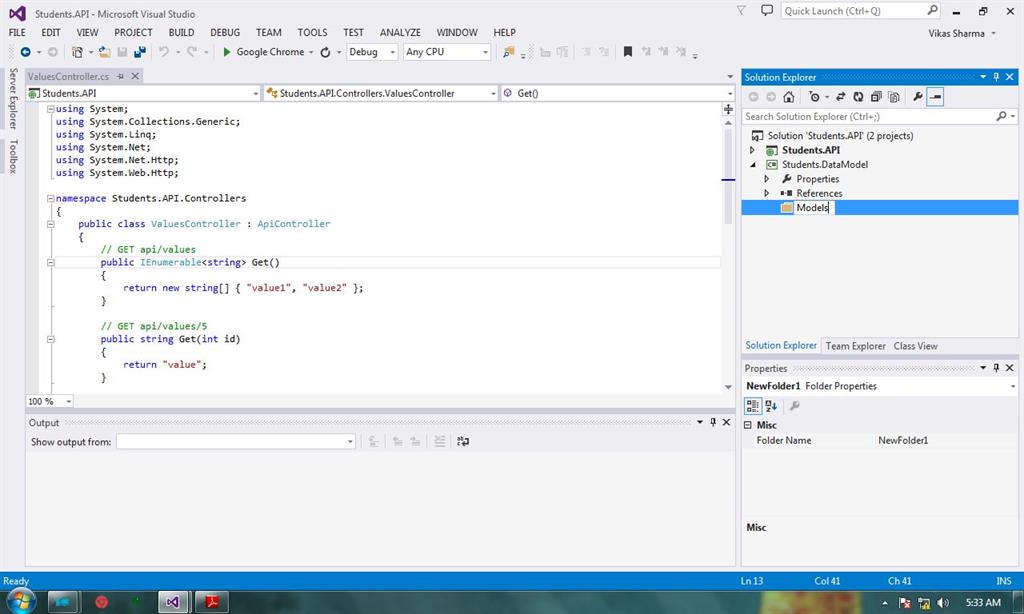
- Add a new class library project to your solution and name it Students.DataModel.
- Delete the default Class1.cs because we won’t need it.
- Create a folder named Models and add a class named Student.cs to it. This class is going to be our Model Class for Student entity of students collection.
- Similarly create a folder named StudentsRepository and add StudentsRepository.cs class to it.
- In the same manner create one more folder named UnitOfWork and add StudentsUnitOfWork.cs to it.
- Before adding any code to Student class we need to add reference of official MongoDB drivers to our Data Model project so that we can communicate to MongoDB.
- Right click on the Data Model project, select Manage NuGet Packages and search for MongoDB.
using MongoDB.Bson.Serialization.Attributes;
namespace Students.DataModel.Models
{
    publicclassStudent
    {
        [BsonElement("_id")]
        publicint StudentID
        {
            get;
            set;
        }
        publicstring RollNo
        {
            get;
            set;
        }
        publicstring Name
        {
            get;
            set;
        }
        publicstring Class
        {
            get;
            set;
        }
    }
}
code of StudentRepository class with the following code:
using MongoDB.Driver;
using MongoDB.Driver.Builders;
using System;
using System.Collections.Generic;
using System.Linq;
using System.Linq.Expressions;
namespace Students.DataModel.StudentRepository
{
    publicclassStudentRepository < T > where T: class
    {
        privateMongoDatabase _database;
        privatestring _tableName;
        privateMongoCollection < T > _collection;
        // constructor to initialise database and table/collection
        public StudentRepository(MongoDatabase db, string tblName)
        {
            _database = db;
            _tableName = tblName;
            _collection = _database.GetCollection < T > (tblName);
        }
        ///<summary>
            /// Generic Get method to get record on the basis of id
        ///</summary>
        ///<param name="i"></param>
        ///<returns></returns>
        ublic T Get(int i)
        {
            return _collection.FindOneById(i);

            ///<summary>
            /// Get all records
            ///</summary>
            ///<returns></returns>
        ublicIQueryable < T > GetAll()
        {
            MongoCursor < T > cursor = _collection.FindAll();
                return cursor.AsQueryable < T > ();
        }
        ///<summary>
        /// Generic add method to insert enities to collection
        ///</summary>
        ///<param name="entity"></param>
        publicvoid Add(T entity)
        {
            _collection.Insert(entity);
        }
        ///<summary>
        /// Generic delete method to delete record on the basis of id
        ///</summary>
        ///<param name="queryExpression"></param>
        ///<param name="id"></param>
        publicvoid Delete(Expression < Func < T, int >> queryExpression, int id)
        {
            var query = Query < T > .EQ(queryExpression, id);
            _collection.Remove(query);
        }
        ///<summary>
        /// Generic update method to delete record on the basis of id
        ///</summary>
        ///<param name="queryExpression"></param>
        ///<param name="id"></param>
        ///<param name="entity"></param>
        publicvoid Update(Expression < Func < T, int >> queryExpression, int id, T entity)
        {
            var query = Query < T > .EQ(queryExpression, id);
            _collection.Update(query, Update < T > .Replace(entity));
        }
    }
Above class is self-explanatory, it is a generic class to handle operation on various collection and different entities. We have created five generic methods to perform CRUD operation on any collection.
First method, will grab one document from the collection initialized on constructor on the basis of integer id provided as the parameter.
Second method, will grab all records from the collection as queryable. See how the FindAll() method returns MongoCursor which then will return entities as queryable.
Third method, as the name suggests will add one entity received as parameter to specified collection.
Fourth method, will delete record on the basis of id provided. Firstly, it will query the collection to search for the document with the id provided and then delete the same.
Fifth method, will query the collection on the basis of id and then update (replace the document found with the new document provided). Id of the old document should match the new document provided. Learn more skills from MongoDB Certification
Now it’s time to replace StudentsUnitOfWork Class with the following code:
using MongoDB.Driver;
using Students.DataModel.Models;
using Students.DataModel.StudentRepository;
using System.Configuration;
namespace Students.DataModel.UnitOfWork
{
    public class StudentsUnitOfWork
    {
        private MongoDatabase _database;
        protected StudentRepository < Student > _students;
        public StudentsUnitOfWork()
        {
            var connectionString = ConfigurationManager.AppSettings["MongoDBConectionString"];
            var client = newMongoClient(connectionString);
            var server = client.GetServer();
            var databaseName = ConfigurationManager.AppSettings["MongoDBDatabaseName"];
            _database = server.GetDatabase(databaseName);
        }
        public StudentRepository < Student > Students
        {
            get
            {
                if (_students == null) _students = newStudentRepository < Student > (_database, "students");
                return _students;
            }
        }
    }
}
Here we created StudentsUnitOfWork class which establishes connection with the MongoDB Server and the database we want to perform CRUD operations and it will simply return the StudentRepository as its property.
Add new key value pair in the appSettings section to web config of Students.API project.
<appSettings>
   <addkey="MongoDBConectionString"value="mongodb://localhost:27017" />
<addkey="MongoDBDatabaseName"value="studentsDB"/>
Creating Services
Now we need services to handle StudentsUnitOfWork and call appropriate method to communicate with the database and return the result to our controller.
Steps
- Add new class library project to your solution named Students.Services.
- Add an interface named IStudentService and a class StudentService that will inherit the interface added to the Students.Services.
- Replace interface code with the following code:
using Students.DataModel.Models;
using System.Linq;
namespace Students.Services
{
    publicinterfaceIStudentService
    {
        void Insert(Student student);
        Student Get(int i);
        IQueryable < Student > GetAll();
        void Delete(int id);
        void Update(Student student);
    }
}
It’s time to add code to your StudentService class and as it will inherit the above interface we will have to provide the body for all the methods of interface. Let’s replace service class code with the following code:
using Students.DataModel.Models;
using Students.DataModel.UnitOfWork;
using System.Linq;
namespace Students.Services
{
    public class StudentService: IStudentService
    {
        private readonly StudentsUnitOfWork _sUnitOfwork;
        public StudentService()
        {
            _sUnitOfwork = newStudentsUnitOfWork();
        }
        public Student Get(int i)
        {
            return _sUnitOfwork.Students.Get(i);
        }
        public IQueryable < Student > GetAll()
        {
            return _sUnitOfwork.Students.GetAll();
        }
        public void Delete(int id)
        {
            _sUnitOfwork.Students.Delete(s => s.StudentID, id);
        }
        public void Insert(Student student)
        {
            _sUnitOfwork.Students.Add(student);
        }
        public void Update(Student student)
        {
            _sUnitOfwork.Students.Update(s => s.StudentID, student.StudentID, student);
        }
    }
}
We have created a private object of StudentsUnitOfWork and initialized it in the constructor. In our first method Get, we are calling generic Get method of StudentsUnitOfWork property’s students (StudentsRepository) which will return Student object. Similarly, second method will return IQueryable objects of student class. Insert method is pretty simple and we are sending a new student object to be added to the StudentsUnitOfWork. Delete and Update method are similar in the sense that in both method lamba expression is used which will delete and update records respectively.
Updating Web API
Let me remind you that our Web API project comes with default controllers Home and Value Controller we need to create our own controller named StudentController for creating RESTful Web APIs. Here are the steps for the same:
- Right click on the Controllers folder in the Students.API project and new controller.
Replace the default code of controller with the following code:
using System.Linq;
using System.Web.Http;
using Students.DataModel.Models;
using Students.Services;
using System.Net.Http;
using System.Net;
namespace Students.API.Controllers
{
    public class StudentsController: ApiController
    {
        privatereadonlyIStudentService _studentService;
        public StudentsController()
            {
                _studentService = newStudentService();
            }
            // GET api/student/id
        public HttpResponseMessage Get(int id)
        {
            var student = _studentService.Get(id);
            if (student != null) return Request.CreateResponse(HttpStatusCode.OK, student);
            return Request.CreateErrorResponse(HttpStatusCode.NotFound, "Student not found for provided id.");
        }
        public HttpResponseMessage GetAll()
        {
            var students = _studentService.GetAll();
            if (students.Any()) return Request.CreateResponse(HttpStatusCode.OK, students);
            return Request.CreateErrorResponse(HttpStatusCode.NotFound, "No students found.");
        }
        public void Post([FromBody] Student student)
        {
            _studentService.Insert(student);
        }
        public void Delete(int id)
        {
            _studentService.Delete(id);
        }
        public void Put([FromBody] Student student)
        {
            _studentService.Update(student);
        }
    }
}
We created five methods or we can say five APIs for handling CRUD operation. In the constructor we created object of the StudentService and in controllers’ method we will call service methods for handling client request.
To get in-depth knowledge, enroll for a live free demo on MongoDB Online Training
 MongoDB Programming