MongoDB connection string

If you’ve been shopping around for a MongoDB client, you may have come across the cumbersome task of manually entering connection details, or writing out a MongoDB connection string in the correct URI format.
Class ConnectionString
java.lang.Object
com.mongodb.ConnectionString
public class ConnectionString
extends Object

Represents a Connection String. The Connection String describes the hosts to be used and options. Learn more from MongoDB Training

The format of the Connection String is:

mongodb://[username:password@]host1[:port1][,host2[:port2],...[,hostN[:portN]]][/[database.collection][?options]]
  • mongodb:// is a required prefix to identify that this is a string in the standard connection format.
  • username:password@ are optional. If given, the driver will attempt to login to a database after connecting to a database server. For some authentication mechanisms, only the username is specified and the password is not, in which case the “:” after the username is left off as well
  • host1 is the only required part of the connection string. It identifies a server address to connect to. Support for Unix domain sockets was added in 3.7. Note: The path must be urlencoded eg: mongodb://%2Ftmp%2Fmongodb-27017.sock and the jnr.unixsocket library installed.
  • :portX is optional and defaults to :27017 if not provided.
  • /database is the name of the database to login to and thus is only relevant if the username:password@ syntax is used. If not specified the “admin” database will be used by default.
  • ?options are connection options. Note that if database is absent there is still a / required between the last host and the ? introducing the options. Options are name=value pairs and the pairs are separated by “&”. For backwards compatibility, “;” is accepted as a separator in addition to “&”, but should be considered as deprecated. Learn more practical skills from MongoDB Online Course

An alternative format, using the mongodb+srv protocol, is:

mongodb+srv://[username:password@]host[/[database][?options]]

Server Selection Configuration:

  • serverSelectionTimeoutMS=ms: How long the driver will wait for server selection to succeed before throwing an exception.
  • localThresholdMS=ms: When choosing among multiple MongoDB servers to send a request, the driver will only send that request to a server whose ping time is less than or equal to the server with the fastest ping time plus the local threshold.

Server Monitoring Configuration:

  • heartbeatFrequencyMS=ms: The frequency that the driver will attempt to determine the current state of each server in the cluster.

Replica set configuration:

  • replicaSet=name: Implies that the hosts given are a seed list, and the driver will attempt to find all members of the set.

Connection Configuration:

  • streamType=nio2|netty: The stream type to use for connections. If unspecified, nio2 will be used.
  • ssl=true|false: Whether to connect using SSL.
  • sslInvalidHostNameAllowed=true|false: Whether to allow invalid host names for SSL connections.
  • connectTimeoutMS=ms: How long a connection can take to be opened before timing out.
  • socketTimeoutMS=ms: How long a send or receive on a socket can take before timing out.
  • maxIdleTimeMS=ms: Maximum idle time of a pooled connection. A connection that exceeds this limit will be closed
  • maxLifeTimeMS=ms: Maximum life time of a pooled connection. A connection that exceeds this limit will be closed

For more in-depth knowledge, enroll for a live free demo on MongoDB Online Training
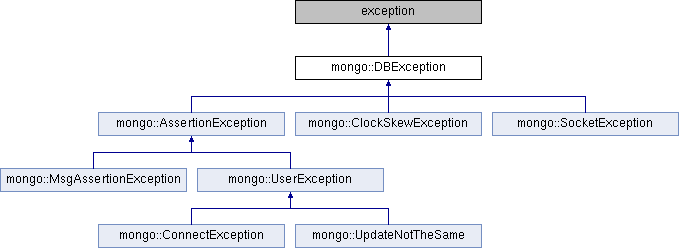
Error Handling in MongoDB

Error Handling:

Error handling using the .NET driver is a requirement for a fault-tolerant system. While MongoDB supports automatic replica set failover and the driver supports multiple mongos’s, this doesn’t make a program immune to errors.

Almost all errors will occur while attempting to perform an operation on the server. In other words, you will not receive an error when constructing a MongoClient, getting a database, or getting a collection.

This is because we are connecting to servers in the background and continually trying to reconnect when a problem occurs. For more additional info MongoDB Online Training

Only when you attempt to perform an operation do those errors become apparent.

Server Selection Errors:

Even when some servers are available, it might not be possible to satisfy a request. For example, using tag sets in a read preference when no server exists with those tags or attempting to write to a replica set when the Primary is unavailable.

Both of these would result in a TimeoutException. Below is an example exception (formatted for readability) when attempting to insert into a replica set without a primary.

System.TimeoutException: A timeout occured after 30000ms selecting a server using 
CompositeServerSelector{ 
    Selectors = 
        WritableServerSelector, 
        LatencyLimitingServerSelector{ AllowedLatencyRange = 00:00:00.0150000 } 
}. 

Client view of cluster state is 
{ 
    ClusterId : "1", 
    Type : "ReplicaSet", 
    State : "Connected", 
    Servers : [
        { 
            ServerId: "{ ClusterId : 1, EndPoint : "Unspecified/clover:30000" }", 
            EndPoint: "Unspecified/clover:30000", 
            State: "Disconnected", 
            Type: "Unknown" 
        }, 
        { 
            ServerId: "{ ClusterId : 1, EndPoint : "Unspecified/clover:30001" }", 
            EndPoint: "Unspecified/clover:30001", 
            State: "Connected", 
            Type: "ReplicaSetSecondary", 
            WireVersionRange: "[0, 3]" 
        }, 
        { 
            ServerId: "{ ClusterId : 1, EndPoint : "Unspecified/clover:30002" }", 
            EndPoint: "Unspecified/clover:30002", 
            State: "Disconnected", 
            Type: "Unknown"
        }, 
    ] 
}

Inspecting this error will tell you that we were attempting to find a writable server. The servers that are known are clover:30000clover:30001, and clover:30002. Of these, clover:30000 and clover:30002 are disconnected and clover:30001 is connected and a secondary. Learn more skills from MongoDB Certification

By default, we wait for 30 seconds to fulfill the request. During this time, we are trying to connect to clover:30000 and clover:30002 in hopes that one of them becomes available and and takes the role of primary. In this case, we timed out waiting.

Connection Errors:

A server may be unavailable for a variety of reasons. Each of these reasons will manifest themselves as a TimeoutException. This is because, over time, it is entirely possible for the state of the servers to change in such a way that a matching server becomes available.

Connection Errors:

A server may go down after it was selected, but before the operation was executed. These will always manifest as a MongoConnectionException. Inspecting the inner exception will provide the actual details of the error.

MongoDB.Driver.MongoConnectionException: An exception occurred while receiving a message from the server. 
---> System.IO.IOException: Unable to read data from the transport connection: Anestablished connection was aborted by the software in your host machine. 
---> System.Net.Sockets.SocketException: An established connection was aborted by the software in your host machine at System.Net.Sockets.Socket.BeginReceive(Byte[] buffer, Int32 offset, Int32 size, SocketFlags socketFlags, AsyncCallback callback, Object state)
   at System.Net.Sockets.NetworkStream.BeginRead(Byte[] buffer, Int32 offset, Int32 size, AsyncCallback callback, Object state)
   --- End of inner exception stack trace ---
... snip ...

We see from this exception that a transport connection that was successfully open at one point has been aborted.

There are too many forms of this type of exception to enumerate. In general, it is not safe to retry operations that threw a MongoConnectionException unless the operation was idempotent. Get practical skills from MongoDB Online Course

Simply getting an exception of this type doesn’t give any insight into whether the operations was received by the server or what happened in the server if it was received.

Write Exceptions:

When performing a write, it is possible to receive a MongoWriteException. This exception has two important properties, WriteError and WriteConcernError.

Write Error:

A write error means that there was an error applying the write. The cause could be many different things. The WriteError contains a number of properties which may help in the diagnosis of the problem. The Code property will indicate specifically what went wrong. For general categories of errors, the driver also provides a helpful Category property which classifies certain codes.

MongoDB.Driver.MongoWriteException: A write operation resulted in an error. E11000 duplicate key error index: test.people.$_id_ dup key: { : 0 } 
---> MonoDB.Driver.MongoBulkWriteException`1[MongoDB.Bson.BsonDocument]: A bulk write oeration resulted in one or more errors. E11000 duplicate key error index: test.people.$_id_ dup key: { : 0 }
   at MongoDB.Driver.MongoCollectionImpl`1.<BulkWriteAsync>d__11.MoveNext() in :\projects\mongo-csharp-driver\src\MongoDB.Driver\MongoCollectionImpl.cs:line 16

We see from this exception that we’ve attempted to insert a document with a duplicate _id field. In this case, the write error would contain the category DuplicateKeyError.

Write Concern Error:

A write concern error indicates that the server was unable to guarantee the write operation to the level specified. See the server’s documentation for more information.

Bulk Write Exceptions:

MongoBulkWriteException will occur when using the InsertManyAsync or BulkWriteAsync. This exception is just a rollup of a bunch of individual write errors. It also includes a write concern error and a Result property.

To get in-depth knowledge, enroll for a live free demo on MongoDB Training

MongoDB : Insert Document(s) in Collection Examples

The insert() Method:

The insert() method inserts one or more documents into a collection. Each document is provided as a parameter. The collection name is prepended to the insert() method.

MongoDB Example: Insert Multiple Documents in collection:

To insert multiple documents in collection, we define an array of documents and later we use the insert() method on the array variable as shown in the example below.

Here we are inserting three documents in the collection named “students”. This command will insert the data in “students” collection. For more info MongoDB Training

if the collection is not present then it will create the collection and insert these documents.

var beginners =
 [
    {
	"StudentId" : 1001,
	"StudentName" : "Steve",
        "age": 30
    },
    {
	"StudentId" : 1002,
	"StudentName" : "Negan",
        "age": 42
    },
    {
	"StudentId" : 3333,
	"StudentName" : "Rick",
        "age": 35
    },
];
db.students.insert(beginners);
Insert BasicDBObject in collection:

This one is simplest. Create an instance of BasicDBObject, populate data and call collection.insert() method. Learn practical skills from MongoDB Certification

BasicDBObject document = new BasicDBObject();
document.put("name", "lokesh");
document.put("website", "howtodoinjava.com");
 
BasicDBObject documentDetail = new BasicDBObject();
documentDetail.put("addressLine1", "Sweet Home");
documentDetail.put("addressLine2", "Karol Bagh");
documentDetail.put("addressLine3", "New Delhi, India");
 
document.put("address", documentDetail);
 
collection.insert(document);
 
Output:
 
{ "_id" : { "$oid" : "538d56a3364192189d4f98fe"} , "name" : "lokesh" , "website" : "howtodoinjava.com" , 
"address" : { "addressLine1" : "Sweet Home" , "addressLine2" : "Karol Bagh" , "addressLine3
Use DBObjectBuilder to insert document in collection:

Very similar to above example, only uses DBObjectBuilder to build DBObject.

BasicDBObjectBuilder documentBuilder = BasicDBObjectBuilder.start()
        .add("name", "lokesh")
        .add("website", "howtodoinjava.com");
  
BasicDBObjectBuilder documentBuilderDetail = BasicDBObjectBuilder.start()
.add("addressLine1", "Some address")
.add("addressLine2", "Karol Bagh")
.add("addressLine3", "New Delhi, India");
 
documentBuilder.add("address", documentBuilderDetail.get());
 
collection.insert(documentBuilder.get());
 
Output:
 
{ "_id" : { "$oid" : "538d56a3364192189d4f98ff"} , "name" : "lokesh" , "website" : "howtodoinjava.com" , 
"address" : { "addressLine1" : "Sweet Home" , "addressLine2" : "Karol Bagh" , "addressLine3

To get in-depth knowledge, enroll for a live free demo on MongoDB Online Training

NoSQLBooster 5.2 Released! official support for MongoDB 4.2

We’re so proud to release NoSQLBooster for MongoDB 5.2 today. This version includes official support for MongoDB 4.2 along with some useful improvements and bugfix.

MongoDB 4.2 support

NoSQLBooster for MongoDB 5.2 upgrades embedded MongoDB Shell to 4.2.0, adds support for all the new shell methods and operations of MongoDB 4.2.

Merge and Other New Aggregation Stages

MongoDB 4.2 adds a few new aggregation pipeline stages, $merge, $planCacheStats, $replaceWith, $set and $unset. NoSQLBooster 5.2 adds these chain methods to AggregationCursor and provide the appropriate code snippets and mouse hover information to support code completion. For more info MongoDB Online Course

db.users.aggregate()
    .planCacheStats({})  
    .replaceWith("$name")
    .set({name: {$concat: ["$f_name", "$l_name"]}})
    .unset(["f_name","l_name"])

Equivalent to the following MongoShell script, but more concise, and easy to write, not to mention code completion.

db.users.aggregate([
    { $planCacheStats: {} },
    { $replaceWith: "$name" },
    { $set: { name: { $concat: ["$f_name", "$l_name"] } } },
    { $unset: ["f_name", "l_name"] }
])

NoSQLBooster 5.2 also enhanced mouse hover for all aggregation chain methods. In addition to method and type definitions, hover is now able to display document and example for these aggregation clain methods. Learn more skills from MongoDB Training

MongoDB 4.2 New Expressions as SQL Functions:

NoSQLBooster 5.2 allows all new Mongodb4.2 aggregation expressions to be used as SQL function in SQL statements. Aggregation Trigonometry Expressions, Aggregation Arithmetic Expressions and Aggregation Regular Expressions (regex) Operators.

Aggregation Trigonometry Expressions:

SELECT 
    sin("value") as sin,--Returns the sine of a value that is measured in radians.
    cos("value") as cos,--Returns the cosine of a value that is measured in radians.
    tan("value") as tan,--Returns the tangent of a value that is measured in radians.
    asin("value") as asin,--Returns the inverse sin (arc sine) of a value in radians.
    acos("value") as acos,--Returns the inverse cosine (arc cosine) of a value in radians.
    atan("value") as atan,--Returns the inverse tangent (arc tangent) of a value in radians.
    atan2("value", "value2") as atan2,--Returns the inverse tangent (arc tangent) of y / x in radians, where y and x are the first and second values passed to the expression respectively.
    asinh("value") as asinh,--Returns the inverse hyperbolic sine (hyperbolic arc sine) of a value in radians.
    acosh("value") as acosh,--Returns the inverse hyperbolic cosine (hyperbolic arc cosine) of a value in radians.
    atanh("value") as atanh,--Returns the inverse hyperbolic tangent (hyperbolic arc tangent) of a value in radians.
    degreesToRadians("value") as degreesToRadians,--Converts a value from degrees to radians.
    radiansToDegrees("value") as radiansToDegrees --Converts a value from radians to degrees.

FROM testCollection

Aggregation Regular Expressions (regex) Operators:

SELECT 
    regexFind(input='Single LINE description.', regex='line', options='i') as regexFind,
    regexFindAll('First lines\nsecond line', 'line', 'i') as regexFindAll,
    regexMatch('Multiple\nline descriptions', 'm.*line', 'is') as regexMatch

FROM testCollection

New Fluent Query Methods

NoSQLBooster 5.2 adds the following new fluent query methods:

//text method performs a text search on the content of the fields indexed with a text index.
db.articles.find({})
     .text({$search: "coffee", $caseSensitive: true}); //Equivalent to:  db.articles.find({$text: { $search: "coffee", $caseSensitive: true}})


//jsonSchema method matches documents that satisfy the specified JSON Schema.
let myschema =  {
    required: [ "item", "qty", "instock" ],
    properties: {
    item: { bsonType: "string" },
    qty: { bsonType: "int" },
    instock: { bsonType: "bool" }
  }
}

db.items.find().jsonSchema(myschema);          //find all documents in the collection that satisfy the schema
db.items.find().nor(qb.jsonSchema(myschema));  //find all documents in the collection that do 

Minor Improvements and Bugfix

  • Fixed, kill operation in monitoring is not allowed when op has no “host” field.
  • Fixed, export to JSON, BSON, CSV with large result set won’t work.
  • Fixed, Kerberos authentication connections where hostname is not the canonical name.
  • Fixed, return the result in object directly when the aggregate option “explain” is true.
  • Fixed, SRV connections with special characters in the password.

To get in-depth knowledge, enroll for a live free demo on MongoDB Online Training

10 Most Common Commands of MongoDB

MongoDB command uses a master-slave replication concept. To prevent database downtime, this replica feature is proved to be a very important feature.

MongoDB command comes with the auto-sharding feature, in which process distributes data across multiple physical partitions known as shards. The result of which automatic load balancing happens.

1. Log Into MongoDB

The following command can be used to log into the MongoDB database. Make sure that the user with credentials such as username and password exist in the database mentioned in place of dbname.

mongo -u <username> -p <password> --authenticationDatabase <dbname>

2. Show All Databases

Once logged in as a user with the appropriate role as userAdmin or userAdminAnyDatabase, the user can see all the databases using a command such as:

show dbs

3. Select Database to Work With

To start working with a particular database, the following command can be executed:

use databaseName

4. Authenticate and Log Out From Database

When switching to a different database using the use dbName command, the user is required to authenticate using a valid database user for that database. The following command can be used for authentication: For more additional info Mongodb Training

// Authenticate
db.auth("username", "password");
// Logout
db.logout()

5. List Down Collections, Users, Roles, etc.

The following commands can be used to check existing collections, users, etc.

//
// List down collections of the current database
//
show collections;
db.getCollectionNames();
//
// List down all the users of current database
//
show users;
db.getUsers();
//
// List down all the roles
//
show roles

6. Create a Collection

The following command can be used to create a collection.

db.createCollection("collectionName");

7. Insert a Document in a Collection

Once a collection is created, the next step is to insert one or more documents. Following is a sample command for inserting a document in a collection.

//
// Insert single document
//
db.<collectionName>.insert({field1: "value", field2: "value"})
//
// Insert multiple documents
//
db.<collectionName>.insert([{field1: "value1"}, {field1: "value2"}])
db.<collectionName>.insertMany([{field1: "value1"}, {field1: "value2"}])

8. Save or Update Document

The save command can be used to either update an existing document or insert a new one depending on the document parameter passed to it. If the _id passed matches an existing document, the document is updated. Otherwise, a new document is created. Internally, thesave method uses either the insert or the update command.

//
// Matching document will be updated; In case, no document matching the ID is found, a new document is created
//
db.<collectionName>.save({"_id": new ObjectId("jhgsdjhgdsf"), field1: "value", field2: "value"});

9. Display Collection Records

The following commands can be used to retrieve collection records:

//
// Retrieve all records
//
db.<collectionName>.find();
//
// Retrieve limited number of records; Following command will print 10 results;
//
db.<collectionName>.find().limit(10);
//
// Retrieve records by id
//
db.<collectionName>.find({"_id": ObjectId("someid")});
//
// Retrieve values of specific collection attributes by passing an object having 
// attribute names assigned to 1 or 0 based on whether that attribute value needs 
// to be included in the output or not, respectively.
//
db.<collectionName>.find({"_id": ObjectId("someid")}, {field1: 1, field2: 1});
db.<collectionName>.find({"_id": ObjectId("someid")}, {field1: 0}); // Exclude field1
//
// Collection count
//
db.<collectionName>.count();

10. Administrative Commands

Following are some of the administrative commands that can be helpful in finding collection details such as storage size, total size, and overall statistics.

db.<collectionName>.stats()
db.printCollectionStats()
//
// Latency statistics for read, writes operations including average time taken for reads, writes
// and related umber of operations performed
//
db.<collectionName>.latencyStats()
//
// Get collection size for data and indexes
//
db.<collectionName>.dataSize() // Size of the collection
db.<collectionName>.storageSize() // Total size of document stored in the collection
db.<collectionName>.totalSize() // Total size in bytes for both collection data and indexes
db.<collectionName>.totalIndexSize() // Total size of all indexes in the collection

To get in-depth knowldege, enroll for a live free demo on MongoDB Online Training
Explain about Atomicity and Transactions in MongoDB?

LSI 8 inserted 4 Atomicity and Transactions in MongoDB:

MongoDB is an open-source document database. It provides high availability, high performance, and auto-scaling. MongoDB has recently updated the latest version i.e MongoDB 4.0, to support the multi-document ACID Transaction properties.

Atomicity:  In database systems, Atomicity is one of the ACID(Atomicity, Consistency, isolation, durability) Transaction properties. In the database atomic operation is an inseparable and complex series of database operations such that either all operations will occur or nothing will occur.

The term atomicity is used to guarantee that there will be no partial database update i.e either the entire lot of data update will happen or nothing will happen at all and partial changes will be rolled back.

An example of an atomic transaction is a money transfer from bank account A to account B. It has two operations, withdrawing the money from account A and saving it to account B.

To perform these tasks in an atomic transaction ensures that the database remains in a consistent state,i.e money is neither lost nor created if either of those two operations fail. For more additional info MongoDB Online Training

Limitations:

 The following are some of the MongoDB atomicity limitations. Those are

  •  There is no support for different documents in atomic transactions in MongoDB.
  • MongoDB provides atomicity operations only for a single document. For example, if a document has fifty fields then the update statement will have either fifty fields or nothing. 
  • Automaticity only maintained at the document-level.

Transactions: A transaction is a piece of work performed in a database management system in opposition to a database and treated as a logical and reliable way independent of other transactions. A transaction generally represents any difference in a database. 

Transaction Sessions:

There are 3 new commands using for creating, committing and aborting transactions.

  • session.startTransaction(): This command is used to start a new transaction in the current session.
  • session.commiTtransaction(): This transaction is used for saving consistency and durability changes made by the operations in the transactions.
  • session.AbortTransaction(): This transaction will end without saving any of the changes made by the operations in the transactions. 

Transaction properties:

The MongoDB  transactions will have the following properties:

  •  When the transaction is committed, all the data changes in the transactions are saved.
  • If any operation in the transaction fails, the transaction terminated.
  • When a transaction terminated, all data changes made in the transaction are discarded. Get practical knowledge from MongoDB Online Course
  • Until a transaction is performed, no write operations in the transaction are visible outside the transaction.

ACID Transactions in MongoDB:

The following are ACID transactions in MongoDB:

Atomicity:  It guarantees each transaction treated as a single “unit”, which either succeeds completely or fails completely,

Consistency: Consistency is that any transaction happens on a database will always bring the database from one to another valid state.

Isolation: This property defines how the changes made by one operation become visible to other simultaneous operations.

Durability: In this, once the transaction is committed and it will always remain permanent irrespective of database crashes, power loss, or errors.

Limitations of Transactions:

        To support transactions we have to know some limitations. They are as follows:

  • A quantity must exist in order to use transactions.
  • A quantity can not be created or dropped inside a transaction.  
  • An index can not be created or dropped inside a transaction.
  • Non-CRUD operations are not permitted inside a transaction.
  • A transaction can not read or write in the config, admin, and local databases.  
  • The size of the transaction is limited to 16MB only.    
  • By default, a transaction that executes for longer than 60 seconds will automatically expire.        

MongoDB Transactions for different technologies:

MongoDB Transaction in c#: 

Following code shows about the MongoDb transactions in C#

CSharpTransactions.cs:

using System;
using System.Collections.Generic;
using System.Linq;
using System.Text;
using System.Threading.Tasks;
using MongoDB.Bson;
using MongoDB.Driver;
using MongoDB.Bson.Serialization.Attributes;

namespace MongoDBTransaction
{
    class Program
    {
        public class Product
        {
            [BsonId]
            public ObjectId Id { get; set; }
            [BetonElement("SKU")]
            public int SKU { get; set; }
            [BsonElement("Description")]
            public string Description { get; set; }
            [BsonElement("Price")]
            public Double Price { get; set; }
        }
       
        const string MongoDBConnectionString = "mongodb+srv://<<MONGODB CONNECTION STRING>>";
 
        static async Task Main(string[] args)
        {
           if (!await UpdateProducts()) { Environment.Exit(0); }
            Console.WriteLine("Finished updating the product collection");
            Console.ReadKey();
        }
        static async Task<bool> UpdateProducts()
        {
            //Generate client connection to our MongoDB database
            var client = new MongoClient(MongoDBConnectionString);

            // Generate a session object that is used when leveraging transactions
            var session = client.StartSession();

            //Generate the collection object that represents the "products" collection
            var products = session.Client.GetDatabase("MongoDBStore").GetCollection<Product>("products");
           
            //approve the collection if there is data in there
            products.Database.DropCollection("products");

            //Generate  some sample data
            var TV = new Product { Declaration = "Television", SKU = 4001, Price = 2000 };
            var Book = new Product { Declaration= "A funny book", SKU = 43221, Price = 19.99 };
            var DogBowl = new Product { Declaration= "Bowl to Fido", SKU = 123, Price = 40.00 };

            //Begin transaction
            session.StartTransaction();

            try
            {
                //Insert the sample data 
                await products.InsertOneAsync(TV);
                await products.InsertOneAsync(Book);
                await products.InsertOneAsync(DogBowl);

                var filter = new FilterDefinitionBuilder<Product>().Empty;
                var results = await products.Find<Product>(filter).ToListAsync();
                Console.WriteLine("Original Prices:\n");
                foreach (Product d in results)
                {
                    Console.WriteLine(String.Format("Product Name: {0}\tPrice: {1:0.00}", d.Description, d.Price));
                }

                // develop all the prices by 10% for all products
                var update = new UpdateDefinitionBuilder<Product>().Mul<Double>(r=>r.Price,1.1);
                await products.UpdateManyAsync(filter, update); //,options);

                //Made it here without error? Let's commit the transaction
                session.CommitTransaction();

                //Let's print the new results to the console
                Console.WriteLine("Original Prices:\n");
                results = await products.Find<Product>(filter).ToListAsync();
                foreach (Product d in results)
                {
                    Console.WriteLine(String.Format("Product Name: {0}\tPrice: {1:0.00}", d.Description, d.Price));
                }
            }
            catch (Exception e)
            {
                Console.WriteLine("Error writing to MongoDB: " + e.Message);
                session.AbortTransaction();
            }
            return true;
        }
      }
}

MongoDB Transaction in Java:

 The following code will demonstrate about the MongoDB transaction  in java Online Training

void runTransactionWithRetry(Runnable transactional) {
    while (true) {
        try {
            transactional.run();
            break;
        } catch (MongoException e) {
            System.out.println("Transaction aborted. Caught exception during transaction.");

            if ((ErrorLabel(MongoException.TRANSITORY_TRANSACTION_ERROR_LABEL)) {
                       continue;
            } else {
                throw e;
            }
        }
    }
}

void commitWithRetry(ClientSession clientSession) {
    while (true) {
        try {
            clientSession.commitTransaction();
            System.out.println("Transaction committed");
            break;
        } catch (MongoException e) {
            // can retry commit
            if ((hasErrorLabel(MongoException.UNKNOWN_TRANSACTION_COMMIT_RESULT_LABEL)) {
                System.out.println("UnknownTransactionCommitResult, retrying commit operation ...")
                continue;
            } else {
                System.out.println("Exception during commit ...");
                throw e;
            }
        }

MongoDB transaction in NOdeJS: the following code shows about the Transaction in nodeJS:

const client = new MongoClient(uri);
  await client.connect();

  await client
    .db('mydb1')
    .collection('foo')
    .insertOne({ abc: 0 }, { w: 'majority' });

  await client
    .db('mydb2')
    .collection('bar')
    .insertOne({ xyz: 0 }, { w: 'majority' });

  // Step 1: Start a Client Session
  const session = client.startSession();

  // Step 2: Optional. Define options to use for the transaction
  const transactionOptions = {
    readPreference: 'primary',
    readConcern: { level: 'local' },
    writeConcern: { w: 'majority' }
  };

  // Step 3: Use with the transaction to start a transaction, execute the callback, and commit (or abort on the error)
  // Note: The callback for with transaction MUST be async and/or return a Promise.
  try {
    await session.withTransaction(async () => {
      const coll1 = client.db('mydb1').collection('foo');
      const coll2 = client.db('mydb2').collection('bar');

      // Important:: You must pass the session to the operations

      await coll1.insertOne({ abc: 1 }, { session });
      await coll2.insertOne({ xyz: 999 }, { session });
    }, transactionOptions);
  } finally {
    await session.endSession();
    await client.close();
  }

In this article, I have given information about the Atomicity and transactions in MongoDB. I hope this gives an idea about the atomicity and transactions of MongoDB in different technologies.

To get in-depth knowledge, enroll for a live free demo on MongoDB Training

Introduce Yourself (Example Post)

This is an example post, originally published as part of Blogging University. Enroll in one of our ten programs, and start your blog right.

You’re going to publish a post today. Don’t worry about how your blog looks. Don’t worry if you haven’t given it a name yet, or you’re feeling overwhelmed. Just click the “New Post” button, and tell us why you’re here.

Why do this?

  • Because it gives new readers context. What are you about? Why should they read your blog?
  • Because it will help you focus you own ideas about your blog and what you’d like to do with it.

The post can be short or long, a personal intro to your life or a bloggy mission statement, a manifesto for the future or a simple outline of your the types of things you hope to publish.

To help you get started, here are a few questions:

  • Why are you blogging publicly, rather than keeping a personal journal?
  • What topics do you think you’ll write about?
  • Who would you love to connect with via your blog?
  • If you blog successfully throughout the next year, what would you hope to have accomplished?

You’re not locked into any of this; one of the wonderful things about blogs is how they constantly evolve as we learn, grow, and interact with one another — but it’s good to know where and why you started, and articulating your goals may just give you a few other post ideas.

Can’t think how to get started? Just write the first thing that pops into your head. Anne Lamott, author of a book on writing we love, says that you need to give yourself permission to write a “crappy first draft”. Anne makes a great point — just start writing, and worry about editing it later.

When you’re ready to publish, give your post three to five tags that describe your blog’s focus — writing, photography, fiction, parenting, food, cars, movies, sports, whatever. These tags will help others who care about your topics find you in the Reader. Make sure one of the tags is “zerotohero,” so other new bloggers can find you, too.

Design a site like this with WordPress.com
Get started